In this article
The four ways to navigate on a Harley
1. Your phone in a mount on the handlebars. The cheapest solution and your maps are always up to date. Downsides: a phone screen is hard to read in the sun, awkward to use with gloves, and vibrations from a V-twin can damage the camera of some phones. Fine for short rides, less so for a touring season.
2. A dedicated motorcycle GPS, such as a TomTom Rider or Garmin zūmo. Made for the motorcycle: waterproof, large readable screen, usable with gloves and often with route planning over twisty roads. Downsides: an extra device on your handlebars, a separate mount and map updates you have to keep up yourself. And your music and phone calls usually don’t go through your speakers with it.
3. A separate CarPlay screen on the handlebars. There are screens you can mount on any motorcycle that show wireless Apple CarPlay or Android Auto from your phone, for example from Chigee or Carpuride. Handy on a Softail, Dyna or Sportster without a fairing. Downside: this too is an extra device with its own power supply and mount.
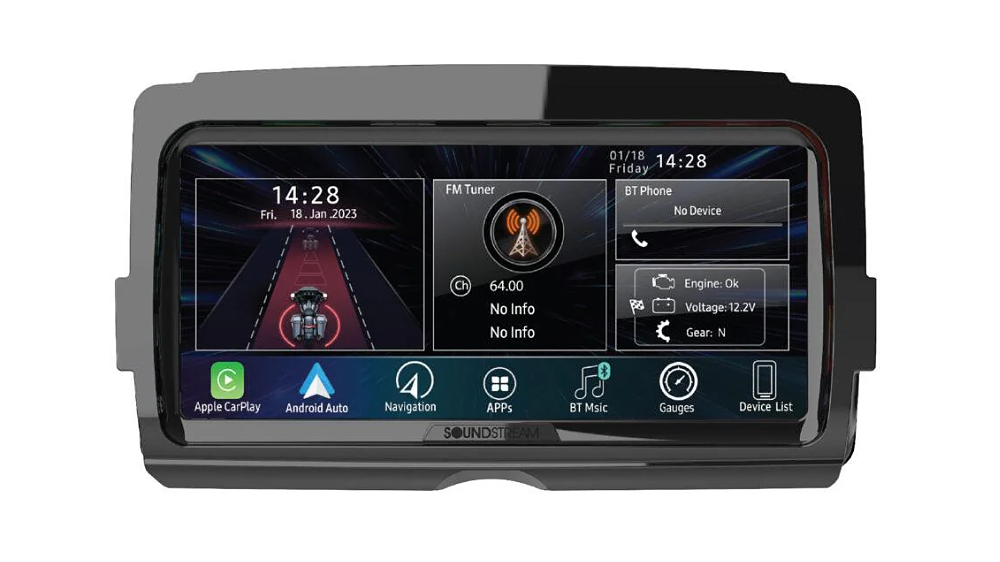
4. Replacing the radio in the fairing with a CarPlay radio. Do you have a Harley Touring with a fairing, such as a Street Glide, Road Glide, Electra Glide or Ultra? Then you can replace the original radio with a plug-and-play radio with wireless Apple CarPlay and Android Auto, like those from Soundstream. Google Maps or Waze then appears large on the screen in your fairing, exactly where you’re looking anyway.
At a glance: what suits you?
- No fairing (Softail, Dyna, Sportster): phone mount, dedicated motorcycle GPS or a separate CarPlay screen on the handlebars.
- Touring with fairing, you mainly ride in Europe: a CarPlay radio in the fairing. Your navigation, music and phone are in one screen and your handlebar controls keep working.
- You ride a lot off-road or in areas without coverage: a dedicated motorcycle GPS with maps on board, possibly alongside your radio.
- You want it as cheap as possible: a good phone mount with a vibration damper.
Why a CarPlay radio in the fairing works so well on a Touring
The original radios in older Harleys have no smartphone connection and a small, hard-to-read display. A modern replacement solves that in one go:
- Navigation on the big screen: Google Maps, Waze or Apple Maps via CarPlay or Android Auto, always with the latest maps and live traffic.
- Your phone stays in your pocket or tank bag: the connection is wireless.
- Spoken directions through your speakers or headset, while your music keeps playing.
- Handlebar controls keep working: volume, next track and source from the handlebars.
- Plug-and-play: the radio fits the original fairing and the original connector. Nothing is cut, so you can always go back to the old radio.
- Made for the motorcycle: the screen is readable in the sun, works with gloves and the front panel is water-resistant.
Navigating with CarPlay in Europe
Navigating via CarPlay or Android Auto uses your phone’s maps. They work all over Europe and are always up to date. Going to an area with poor coverage? Download offline maps in Google Maps or Apple Maps in advance; Waze does need mobile data.
Some Soundstream radios also have built-in GPS (iGo). By default it only has maps of the US and Canada. So in Europe you navigate via CarPlay or Android Auto on the radio’s screen.
Which CarPlay radio fits my Harley?
That depends on your fairing and your model year:
- Street Glide, Electra Glide, Ultra or Tri Glide (batwing fairing), 1998-2013: the Soundstream WHD.SG (7″) or the top model SG.V2 (8.3″).
- Road Glide (sharknose fairing), 1998-2013: the Soundstream WHD.RG.
- Touring 2014-2023: the Soundstream WHD14+ (7″) or the V2 (8″, with headsets and gauges on screen).
- Touring from model year 2024: those models are built completely differently; the radios above don’t fit them.
Not sure which fairing you have or which radio fits? See the overview of all Harley radios with CarPlay or send us your VIN or a photo of your fairing on WhatsApp.